Building a Contact Form with the Gmail API and OAuth2
When I started setting up my site I wanted to include a contact form, but I didn't feel like dealing with another third-party service. Turns out the Gmail API is perfect for this, and it's surprisingly straightforward once I got my arms around the OAuth2 flow.
Why a Contact Form?
My first thought was simple: just link my email address on the site. But I quickly realized I didn't want to expose that personal information publicly on the internet. A contact form solves this by letting visitors reach me while keeping my actual email address private.
Why the Gmail API?
I looked at a few options for handling contact form submissions. SendGrid and Mailgun are great, but they felt like overkill for a personal site. SMTP works, but managing app-specific passwords is kind of annoying. The Gmail API hit the sweet spot:
- Use what I already have - My existing Gmail account, no new accounts needed
- Actually secure - OAuth2 handles everything, no passwords floating around
- Generous free tier - 2,000 emails/day is way more than I'll ever need
- Battle-tested - Gmail handles billions of emails a day worldwide, so reliability isn't a concern
- Deploy anywhere - Works on Cloud Run, Vercel, wherever
I was surprised by how easy it was to set up the OAuth2 refresh tokens. You authorize once, get a token, and then emails just work automatically!
How OAuth2 Actually Works Here
- You click authorize - One time, in your browser, you say "yes, this app can send emails"
- Google gives you a refresh token - Think of it as a long-lived permission slip
- The library does the rest - googleapis automatically handles refreshing access tokens
- Deploy and forget - Same token works on your laptop, in production, anywhere
You authorize once on your local machine, grab the refresh token, and deploy it. From then on, emails just work. No clicking, no user interaction, no expiration headaches (unless you revoke it yourself).
Setting Up GCP
First, Enable the Gmail API
This is the easy part - just one command:
gcloud services enable gmail.googleapis.com --project=YOUR_PROJECT_IDCreate OAuth2 Credentials
Head over to the GCP Console and:
- Go to APIs & Services → Credentials
- Click "Create Credentials" → "OAuth 2.0 Client ID"
- Application type: "Web application"
- Add redirect URI:
http://localhost:3000/api/auth/callback - Save the Client ID and Client Secret
OAuth Consent Screen
Google needs to know what permissions you're asking for:
- Go to APIs & Services → OAuth consent screen
- Pick "External" (standard Gmail accounts require this setting)
- Add the scope:
https://www.googleapis.com/auth/gmail.send - Add yourself as a test user
The Code
Alright, let's look at how this actually works. I'm using googleapis and google-auth-library - Google's official packages. The full code is on GitHub if you want to see everything.
Getting Your Refresh Token
I wrote a small script (scripts/get-gmail-token.js) that handles the one-time OAuth dance. It spins up a local server, opens your browser, and spits out the refresh token you need:
// scripts/get-gmail-token.js
const { google } = require('googleapis');
const http = require('http');
const url = require('url');

const oauth2Client = new google.auth.OAuth2(
  process.env.GMAIL_CLIENT_ID,
  process.env.GMAIL_CLIENT_SECRET,
  'http://localhost:3000/api/auth/callback'
);

const scopes = ['https://www.googleapis.com/auth/gmail.send'];

async function getToken() {
  const authUrl = oauth2Client.generateAuthUrl({
    access_type: 'offline',
    scope: scopes,
    prompt: 'consent' // Force to get refresh token
  });

  console.log('Authorize this app by visiting this url:', authUrl);

  // Use dynamic import for ES module
  const open = (await import('open')).default;
  await open(authUrl);

  const server = http.createServer(async (req, res) => {
    if (req.url.indexOf('/api/auth/callback') > -1) {
      const qs = new url.URL(req.url, 'http://localhost:3000').searchParams;
      const code = qs.get('code');

      res.end('Authentication successful! You can close this window.');
      server.close();

      const { tokens } = await oauth2Client.getToken(code);
      console.log('\n\nAdd this to your .env.local file:');
      console.log(`GMAIL_REFRESH_TOKEN=${tokens.refresh_token}`);
      process.exit(0);
    }
  }).listen(3000);
}

getToken();
Run It Once
Set your credentials and run it - it'll pop open a browser and you click "allow":
export GMAIL_CLIENT_ID="your-client-id"
export GMAIL_CLIENT_SECRET="your-client-secret"
npm run get-gmail-token
Copy the refresh token it outputs. That's it. Never have to do this again.
The Gmail Utility Module
All the Gmail API stuff lives in lib/gmail.ts. It handles OAuth, constructs properly formatted MIME messages and sends them via the API:
// lib/gmail.ts
import { google } from 'googleapis';
import { OAuth2Client } from 'google-auth-library';

function getOAuth2Client(): OAuth2Client {
  const oauth2Client = new google.auth.OAuth2(
    process.env.GMAIL_CLIENT_ID,
    process.env.GMAIL_CLIENT_SECRET,
    process.env.GMAIL_REDIRECT_URI
  );

  oauth2Client.setCredentials({
    refresh_token: process.env.GMAIL_REFRESH_TOKEN,
  });

  return oauth2Client;
}

function createMimeMessage(params: {
  to: string;
  from: string;
  replyTo: string;
  subject: string;
  text: string;
  html: string;
}): string {
  const { to, from, replyTo, subject, text, html } = params;

  const messageParts = [
    `From: ${from}`,
    `To: ${to}`,
    `Reply-To: ${replyTo}`,
    `Subject: ${subject}`,
    'MIME-Version: 1.0',
    'Content-Type: multipart/alternative; boundary="boundary"',
    '',
    '--boundary',
    'Content-Type: text/plain; charset="UTF-8"',
    '',
    text,
    '',
    '--boundary',
    'Content-Type: text/html; charset="UTF-8"',
    '',
    html,
    '',
    '--boundary--',
  ];

  return messageParts.join('\r\n');
}

export async function sendEmail(params: {
  to: string;
  from: string;
  replyTo: string;
  subject: string;
  text: string;
  html: string;
}): Promise<void> {
  const oauth2Client = getOAuth2Client();
  const gmail = google.gmail({ version: 'v1', auth: oauth2Client });

  const mimeMessage = createMimeMessage(params);
  const encodedMessage = Buffer.from(mimeMessage)
    .toString('base64')
    .replace(/\+/g, '-')
    .replace(/\//g, '_')
    .replace(/=+$/, '');

  await gmail.users.messages.send({
    userId: 'me',
    requestBody: {
      raw: encodedMessage,
    },
  });
}
The Contact Form Endpoint
The actual API route (app/api/contact/route.ts) simply validates the form data and calls our Gmail utility:
// app/api/contact/route.ts
import { NextRequest, NextResponse } from "next/server";
import { sendEmail, validateGmailConfig } from "@/lib/gmail";

export async function POST(request: NextRequest) {
  try {
    validateGmailConfig();

    const { name, email, message } = await request.json();

    if (!name || !email || !message) {
      return NextResponse.json(
        { error: "All fields are required" },
        { status: 400 }
      );
    }

    await sendEmail({
      from: process.env.GMAIL_USER!,
      to: process.env.GMAIL_USER!,
      replyTo: email,
      subject: `Contact form submission from ${name}`,
      text: `Name: ${name}\nEmail: ${email}\n\nMessage:\n${message}`,
      html: `
        <h3>New Contact Form Submission</h3>
        <p><strong>Name:</strong> ${name}</p>
        <p><strong>Email:</strong> ${email}</p>
        <p><strong>Message:</strong></p>
        <p>${message.replace(/\n/g, "<br>")}</p>
      `,
    });

    return NextResponse.json(
      { success: true, message: "Email sent successfully" },
      { status: 200 }
    );
  } catch (error) {
    console.error("Error sending email:", error);
    return NextResponse.json(
      { error: "Failed to send email" },
      { status: 500 }
    );
  }
}
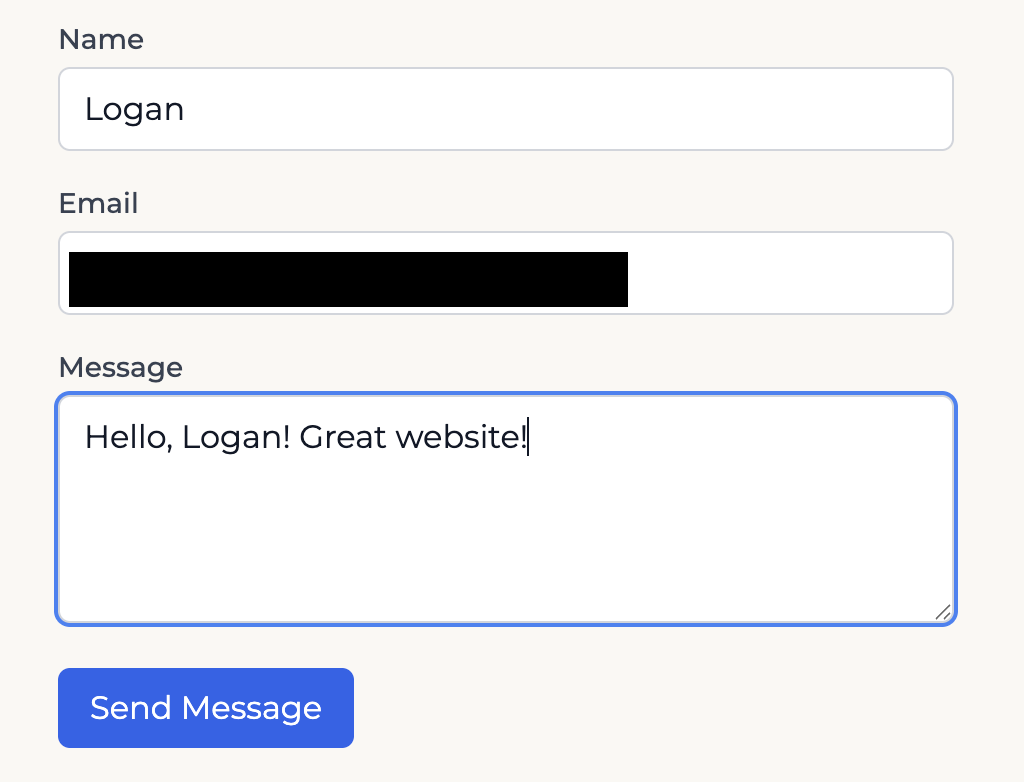
Here's what the contact form looks like when someone fills it out:
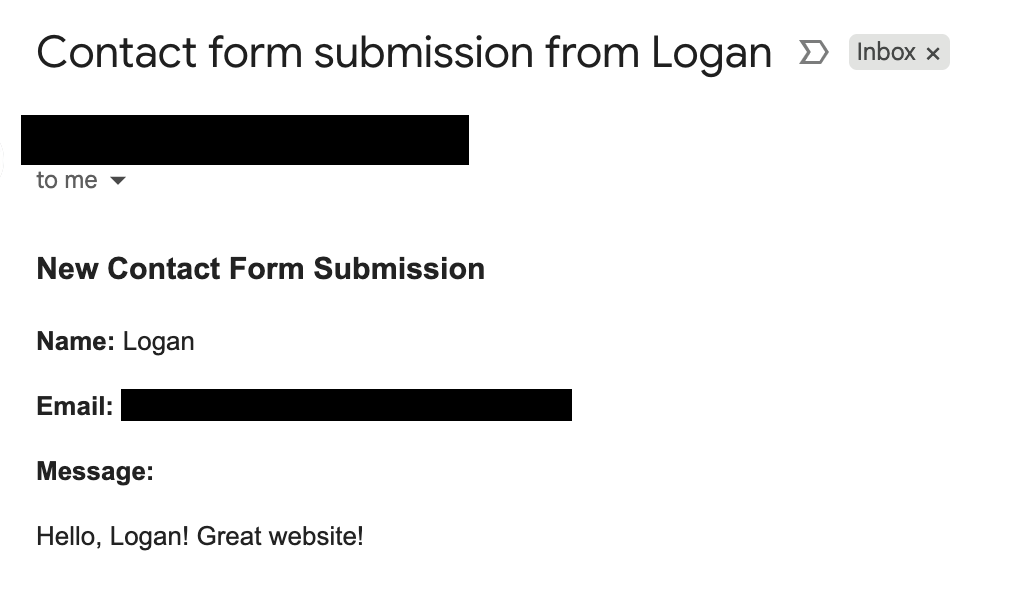
And here's the email I receive in my Gmail inbox:
Deploying to Production
Use Secret Manager
Don't put your credentials directly in environment variables - use Secret Manager. It's built for this and works great with Cloud Run:
# Create secrets
echo -n "your-email@gmail.com" | gcloud secrets create gmail-user --data-file=-
echo -n "your-client-id" | gcloud secrets create gmail-client-id --data-file=-
echo -n "your-client-secret" | gcloud secrets create gmail-client-secret --data-file=-
echo -n "your-refresh-token" | gcloud secrets create gmail-refresh-token --data-file=-

# Grant Cloud Run access
for secret in gmail-user gmail-client-id gmail-client-secret gmail-refresh-token; do
  gcloud secrets add-iam-policy-binding $secret \
    --member="serviceAccount:YOUR_SERVICE_ACCOUNT" \
    --role="roles/secretmanager.secretAccessor"
done
Wire Up GitHub Actions
I use GitHub Actions for deployments (wrote about that here). Just tell Cloud Run to grab the secrets:
- name: Deploy to Cloud Run (main branch)
  if: github.ref == 'refs/heads/main'
  run: |
    gcloud run deploy personal-website \
      --image=${{ secrets.GCP_REGION }}-docker.pkg.dev/${{ secrets.GCP_PROJECT_ID }}/${{ env.REPOSITORY }}/${{ env.IMAGE }}:latest \
      --region=${{ secrets.GCP_REGION }} \
      --platform=managed \
      --allow-unauthenticated \
      --update-secrets="GMAIL_USER=gmail-user:latest,GMAIL_CLIENT_ID=gmail-client-id:latest,GMAIL_CLIENT_SECRET=gmail-client-secret:latest,GMAIL_REFRESH_TOKEN=gmail-refresh-token:latest"
A Few Things Worth Knowing
The Refresh Token Works Everywhere
The refresh token works everywhere. Local dev? Same token in .env.local. Production? Same token in Secret Manager. The googleapis library just handles refreshing access tokens automatically.
Email Format Requirements
The Gmail API wants messages in RFC 2822 format with MIME boundaries and base64url encoding. The utility function handles the complexity automatically. Just call sendEmail().
No Runtime Surprises
This isn't one of those OAuth flows where users have to click "allow" when they submit your form. You authorize once, the token lives on your server, and emails just go out.
Why I Like This Setup
- Secure by default - OAuth2 tokens, no passwords to leak
- Completely free - 2,000 emails/day is way more than I'll ever need
- Set and forget - Token refresh is automatic, deploys anywhere
Final Thoughts
This is simpler than it appears. Setting up the OAuth2 flow seemed intimidating at first, but once I understood the refresh token pattern, it's a one-time setup. After that, it's fire-and-forget.
For a personal website or small project, this hits the sweet spot. You get enterprise-grade security without the complexity, and in my case it allowed me to use tools I already rely on (Gmail, GCP). No new accounts, no additional billing, no third-party dependencies. Clean, simple email that works.